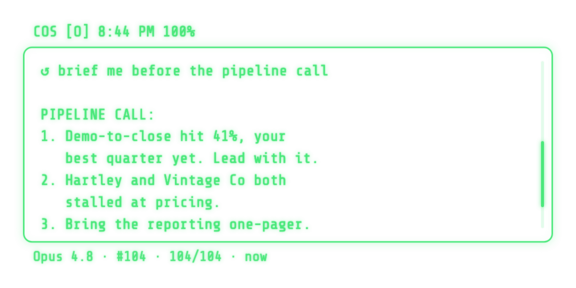
Brief me before the call.
How it works
Numbered, ranked, on the lens. Walk in already knowing the three things that matter, read straight from your meetings and tasks.
Three steps: run the server on your Mac, connect the app on your iPhone, say your first prompt. No decisions required up front — everything is tunable later.
node -v first; newer compatible major versions are fine, so do not install node@20 beside onenpm install -g @anthropic-ai/claude-code (never use sudo), then run claude and finish sign-in. Claude Code setup powers Opus, Fable, and Sonnet; Codex CLI powers GPT Frontier and GPT Balanced. Install both if you can: the server detects and uses whichever you have, and you can switch per query.brew install whisper-cpp once. The setup command verifies disk space before downloading anything. This is required for local voice; text chat works without it.brew install python@3.12 ffmpeg espeak-ng. Python 3.11 or 3.12 is supported. The normal server start provisions Kokoro asynchronously; chat and transcription work while it prepares.Get the glasses live now; tune anything later in Settings. This setup is the same whether or not you already run a COS.
The easy way: COS Control. A menu bar app that installs the server, keeps it running, launches at login, and updates and rolls back safely. Most people should start here.
whisper-cpp and free disk space, provisions the local voice models, then starts the server as a background service.Or the terminal. The same server, running in the foreground. Keep the window open while you use the glasses.
The terminal prints your server URL (Tailscale and Wi-Fi addresses, labeled) and your API token — you'll paste those into the app in Step 2. The token is saved to ~/.cos-glasses/.env. For transcription, install whisper-cpp first and have about 6 GB free; setup verifies space, then provisions Small.en preview, Turbo commit, and Large-v3 HQ models. For optional local spoken replies on Apple silicon, run brew install python@3.12 ffmpeg espeak-ng; the server validates and self-repairs its pinned Kokoro environment.
http:// your Mac’s address :3141: the terminal prints it; with COS Control, use the Mac’s Wi-Fi address from System Settings or its Tailscale address. The token is what the terminal printed, or what Copy Pairing Token put on the clipboard.whisper-cpp is missing, run brew install whisper-cpp, then rerun the server command (Ctrl-C first) or run Guided Setup again in COS Control before tapping the mic.YYYY-MM/*.md meeting folders. If you keep several libraries, choose their parent; each custom-named folder only needs meetings/YYYY-MM/*.md inside. The website does not change your Mac; the final folder choice happens in COS Control. You can also skip this step and use new standalone G2 recordings./cos-glasses skill — ask it: "add the /cos-glasses skill from the Starter Kit." Then /cos-glasses starts the server, health-checks it, keeps it on the latest release, and troubleshoots connection issues for you. Grab it at skills/cos-glasses.md./glasses-day skill and your COS pulls the day's glasses questions and answers into your desk session — so anything you asked on the go becomes something you can act on. Grab it at skills/glasses-day.md.Want to tune model, context, and the lens? Make it yours below. Not technical? Have me set it up.
Nothing here blocks setup — the glasses run great on the defaults. Tune when you're ready; every pick renders a personalized checklist at the bottom.
Pick all that apply. Everything below tunes to your answer.
A soft default, not a commitment — every model stays available per query, by voice or from the toolbar. Opus, Fable, and Sonnet follow Claude Code; GPT Frontier and GPT Balanced follow the newest capable Codex generation automatically.
COS_CLAUDE_TRUST_MODE=allowlist in the server environment before you launch. The query keeps web search and read-only access to your workspace, while shell, edits, and writes are denied. Needs server 6.41.0 or newer. Earlier servers denied workspace reads too, so a hardened install answered "I don't have access to your workspace files." Either way COS instructs the model to treat web pages, files, and transcripts as data, never as instructions.Set the name of the person COS serves. It personalizes answers and the Knowledge graph’s starting point. You can change it in COS Control → Memories → Memory settings → Owner name. This is separate from the Mac that indexes your documents.
Wire the sources you live in. We pre-select what fits your use cases. Adjust freely.
YYYY-MM/*.md. Organize several libraries only if you already work that way; their names are entirely yours.Two stores, both plain markdown on your own machine, both readable from the lens.
Individual notes worth keeping: a decision and why, a correction you had to make twice, a fact about a person. One file per note. On the glasses you browse them by type and summary, and double-tap one to ask a follow-up grounded in that exact record.
Work that spans weeks: a launch, a hire, a renewal. One file per thread, appended as it moves, so the whole arc stays in one place instead of scattered across meetings.
The server runs on your Mac. Your keys, your machine. Pick how voice is transcribed.
tts_local.ready in /api/health.ffmpeg on the Mac for normalized phone uploads, private answer-image galleries, and exact 288×144 G2 previews. Images never need a COS-hosted cloud.Your default layout. Adaptive switches it by context.
Make your picks above and your personalized setup appears here.
The app half installs from the Even Hub on your iPhone — covered in Step 2 of the setup above.
Want it done for you? Have me set it up.
npm install -g @anthropic-ai/claude-code without sudo, then run claude and finish sign-in. GPT Frontier/Balanced need Codex.brew install ffmpegRuns on your own Mac, as a background service under COS Control or in a terminal you keep open.
Or in the terminal:
brew install whisper-cpp. Since COS Glasses 6.8.336, you can also choose on-phone Moonshine Tiny or Base for rolling Message and Meeting preview. Text forms and may revise while you speak; the shared glossary + AI finalizer cleans settled phrases, while speaker-attributed Large-v3 remains canonical for meetings. This requires server 6.27.2 or newer. Cloud fallback stays off unless the server operator explicitly enables it with COS_OPENAI_WHISPER_FALLBACK=1 and configures a key./cos-glasses skill so your agent starts the server, health-checks it, keeps it on the latest release, and troubleshoots for you — ask your COS to "add the /cos-glasses skill from the Starter Kit" (skills/cos-glasses.md).100.).npm install -g @anthropic-ai/claude-code on one line without sudo, then run claude and finish sign-in. Verify with claude --version.npm_config_cache="$HOME/.cos-glasses/npm-cache" npx --yes @gotcos/glasses-server@latest. Server 6.12.2+ does not run a second install inside npm's temporary cache.@latest launched an older version — compare /api/health with npm view @gotcos/glasses-server dist-tags.latest, then restart with npm_config_prefer_online=true npm_config_cache="$HOME/.cos-glasses/npm-cache" npx --yes @gotcos/glasses-server@latest.codex --version, then codex login.brew install whisper-cpp for free local transcription. Cloud fallback remains off unless an administrator sets both COS_OPENAI_WHISPER_FALLBACK=1 and OPENAI_API_KEY.brew install python@3.12 ffmpeg espeak-ng, restart COS, and allow first-run Kokoro provisioning to finish. Confirm tts_local.ready in /api/health. Explicit Local fails closed; choose OpenAI only if you intend to use your key.brew install ffmpeg, restart with npx --yes @gotcos/glasses-server@latest, and confirm Lens images is on before testing outside a meeting.npx --yes @gotcos/glasses-server@latest.Your Even G2, running as a chief of staff on the lens. The context you have already built, now it follows you off the screen.
No slide deck. No black box. You own it, you do not rent it.
[Priya] if we shift budget to the comparison pages we can hold CPA under target through July.
[You] Lock that in. Flag it in the recap as a decision.
[Marcus] I will have the brief ready Thursday morning.
[Priya] And let us pull the Q3 numbers first.
Numbered, ranked, on the lens. Walk in already knowing the three things that matter, read straight from your meetings and tasks.
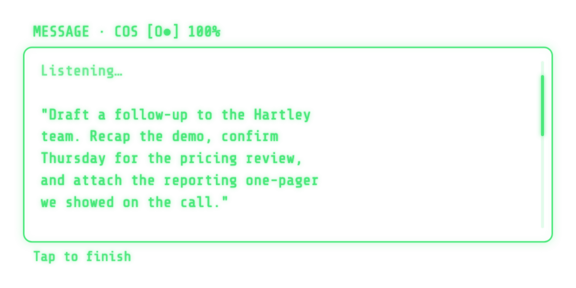
Dictate a long prompt or reply by voice. With on-phone Moonshine, text forms and revises while you speak, then the existing finalizer cleans the settled draft. Review it, edit by voice, or re-record before a single word is sent.
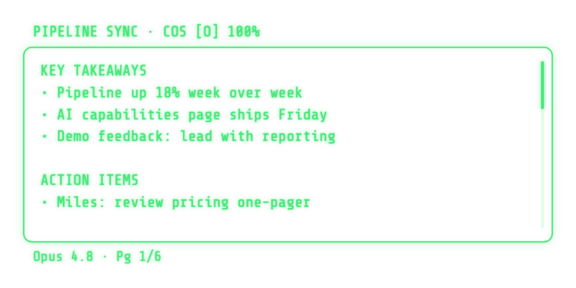
Fast Moonshine preview can appear while you speak, then speaker-attributed Large-v3 replaces it as the canonical transcript. Takeaways and action items wait for you afterward, right from the glasses.
Dictate a long prompt or reply by voice. Moonshine Tiny or Base can form and revise the text on the lens as you speak; the shared finalizer cleans the settled draft before review. No keyboard required.
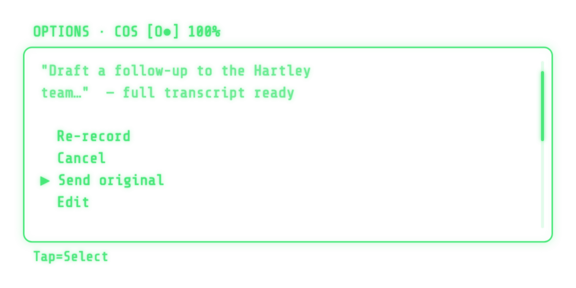
Confirm, edit, or send with a tap. The HUD is there when you need it and gone when you do not. Never a phone, never a screen between you and the room.